Useful online resources for location shoots
I thought it might be handy to make a small collection of web-based resources for outdoor photography and similar activities. Some of these resources are right here on GarfNet. The rest are dotted around the worldwide web. So I thought it would be helpful to list all these links here, all on a single page, together with a brief explanation of each resource.
Working online…
Maps
OpenStreetMap
A useful free alternative to both Google and Ordnance Survey is provided by the OpenStreetMap project:-
OpenStreetMap started life in Britain but now covers the entire planet. It is founded on some pretty solid web-friendly logic For example the path after the URL is simply
- https://openstreetmap.org /#map=[zoom-level]/[latitude]/[longitude]
So the URL for Havant railway station would be:-
OSM Features
- Maps, in every available scale, for every country on the entire planet.
- One may use OSM directly or with any compatible application one pleases for off-line use, including free open source software (FOSS) apps such as Marble and OSMAnd, together with GPS, GLONASS and Biedou geopositioning constellations, c/w route planning, waypoints and favourite locations.
- Shows footways, cycleways, waterfalls, woodlands and a shedload of other stuff. OSM maps may also include useful metadata added by locals and/or frequent visitors.
- If viewed via aforementioned FOSS apps, it shows current location, without telling the supplier of the maps.
- Data collected with the aforementioned FOSS apps is importable and exportable as XML, for use in other mapping applications.
- Grants one free access to its API (application programming interface) that one may freely use in any application one wishes to develop.
- One may display any map in any document publication or website, and edit it as one wishes.
- One may do any or all of this without seeking consent, giving away one’s personal details or handing-over any money.
- The clincher: the aforementioned open-source mapping apps built around OpenStreetMap data can be audited more easily, and function fully offline, with little or no telemetry.
OSM areas, lines and symbols
OSM maps often show a lot more detail than is immediately obvious. To make use fo this detail, these are comprehensive lists of OSM cartographic legends, directly from the OSM wiki pages:-
Areas
Lines
Symbols
NB
OS and OSM are two entirely different entities…
- OS = Ordnance Survey, Britain’s official mapping agency.
- OSM = OpenStreetMap, a map database maintained by a community of volunteers via open collaboration.
OpenStreetMap was created by Steve Coast in response to the Ordnance Survey failing to release its data to the public under free licences in back 2004. It’s quite an interesting story, actually:-
Whilst Ordinance Survey maps are still first class, I sought alternatives when I learned that its massively costly “Retriangulation of Great Britain” (1935–1962) was publicly funded. Since then, for most practical purposes, OpenStreetMap has become much more useful than the Ordnance Survey. And of course, much much cheaper.
Usage and licencing
Unlike other mapping services, OpenStreetMap has very liberal licencing. In a nutshell you may use its maps, put them on your website and various other publications, providing you give OSM a credit. The details are listed here:-
Traffic maps
Traffic England, Traffic Scotland and Traffic Wales provide quite useful traffic maps with (mostly) live cameras on most of the three nations’ trunk roads. Unfortunately there are three different sites, all of which function quite differently from each other. Still, they can be helpful at times:-
England
Scotland
Wales
Handling Ordnance Survey grid references
The following site converts OS grid references to a marker on an online map…
If you scroll to the bottom of the page it also converts the grid reference to standard longitude & latitude.
Tide timetables
If you are photographing a beach or tidal river, tide times can be a crucial factor. Aside from the obvious safety concerns, beaches and riversides can assume a totally different look at low tide compared to high tide. This site provides quite good up-to-date coverage for the whole of the British Isles, based upon OpenStreetMap mapping…
Weather
Some years back I wrote a weather viewer based on METAR data, c/w a recent mobile friendly update. It still works quite well but has been massively superseded by sophisticated visual web applications such as Ventusky.
OpenWeatherMap
Then there is the excellent weather service provided by OpenWeathermap Although it is based in London, OpenWeatherMap covers the entire planet, using a huge number of automatic localised weather monitoring stations. OpenWeatherMap also provides the data source for many desktop and mobile weather widgets.
Like Openstreetmap, OpenWeatherMap’s URL’s are very web-friendly. Every station has a unique number. When you search for a station, its unique number is added to the main URL thus:-
- https://openweathermap.org/city/[stationID]
For example the station in the centre of Havant is
- 2647317
Its URL becomes
Internet radio
These will provide direct DASH and HLS radio streams for BBC national and local radio stations. These can be handy if you want to know what the weather and traffic is doing three counties away.
These streams can be played directly or added as a playlist to any good media player, such as VLC. I Have also built a rudimentary player for these streams. It is a bit buggy, but it works:-
- GarfNet Internet Radio Player – this thing still needs some polish, but it works. https://garfnet.org.uk/radio
Working offline too…
These will work on-line and offline.
Mapping applications
OSMAND+
OSMAND+ is an excellent alternative to Google maps, based upon OpenStreetMap. It is using open source software, that does not give up your location to a foreign corporation in a foreign jurisdiction. Free, open source, with no hidden nasties its maps download locally and updated monthly. Which means it works even when you don’t have a live internet connection. It also integrates nicely with your device’s GPS/GLONASS/Beidou sensors:-
It’s also easy to take a screengrab to use to illustrate an article or send to other members of your team. This one was for my recent photo-jaunts to the stork nests at Knepp, and the nearby Kings Mill, smock windmill, Shipley in West Sussex..
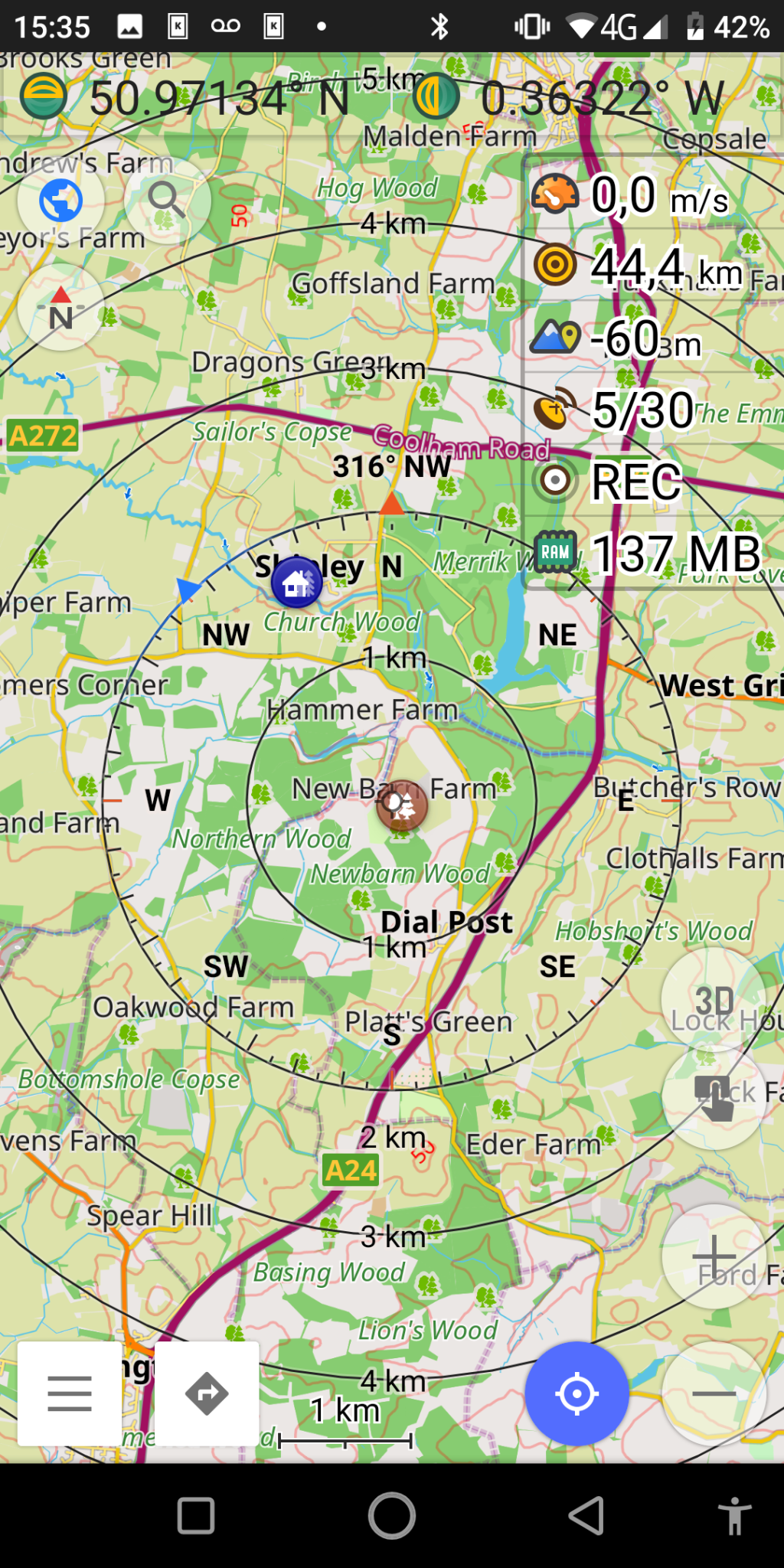
OSMAND is also available on Google Play, but the FDroid version is better because all the map downloads are free, and the source-code checked for obvious nasties.
SatStat
While you are at it, you might find SatStat handy for actually locating and managing positioning satellites.
Marble
If you use Debian GNU/Linux, or one of its derivatives (such as Ubuntu, Kubuntu, Kali, Mint, KDE Neon et al) then you might find KDE Marble a useful addition to your mapping arsenal. This is a desktop application. However it is possible to import and export data to/from Marble and OSMAnd+. To install Marble on Debian-based systems, open a terminal, type the following and hit the return key:-
sudo apt install marble
There are also versions for Android and Apple MacOS and Microsoft Windows. You might also wish to refer to the KDE Marble official site and its corresponding Wikipedia page:-
A few other free applets that I find handy while I’m on the road…
These free responsive tools are my own creations and work quite well on both desktop and mobile devices. No installation is required. If you don’t have roaming data on your phone, these applets will also work off line. Simply load into a separate tab in your browser before you leave the house. Just don’t close the tab while you are away from the internet! 😉
- Depth of field calculator – for most popular lenses and cameras. https://garfnet.org.uk/dof
- Scientific calculator – useful if say you wish to calculate height of a building or similar using h = d.tanΘ or similar: https://garfnet.org.uk/calc
- Units converter – handy if you live in a country such as the UK, where metrication is still not complete and is unlikely to be any time soon: https://garfnet.org.uk/converter
British National Parks
For readers in the UK looking for interesting places to take pictures, here is a list of British National Parks, with their approximate land areas in km² and links to their corresponding Wikipedia pages. Land areas are approximate:-
England
National Park |
Area (km²) |
Wikipedia URL |
|---|---|---|
The Broads |
303 |
|
Dartmoor |
954 |
|
Exmoor |
692 |
|
Lake District |
2,362 |
|
New Forest |
566 |
|
North York Moors |
1,436 |
|
Northumberland |
1,049 |
|
Peak District |
1,437 |
|
South Downs |
1,627 |
|
Yorkshire Dales |
2,178 |
Scotland
National Park |
Area (km²) |
Wikipedia URL |
|---|---|---|
Cairngorms |
4,528 |
|
Loch Lomond & The Trossachs |
1,865 |
Wales
National Park |
Area (km²) |
Wikipedia URL |
|---|---|---|
Bannau Brycheiniog (Brecon Beacons) |
1,344 |
|
Eryri (Snowdonia) |
2,142 |
|
Pembrokeshire Coast |
629 |
Areas
For those who aren’t familiar with the metric system, this is how areas work. Imperial conversions are approximate…
- 1 are = 100 m²
- 1 hectare (Ha) = 10,000 m²
- 1 km² = 100 Ha = 1,000,000 m²
- 1 acre = 22 yards x 220 yards ≈ 4000 m²
- 1 mile² ≈ 2.6 km²
- More accurate conversions: https://garfnet.org.uk/converter