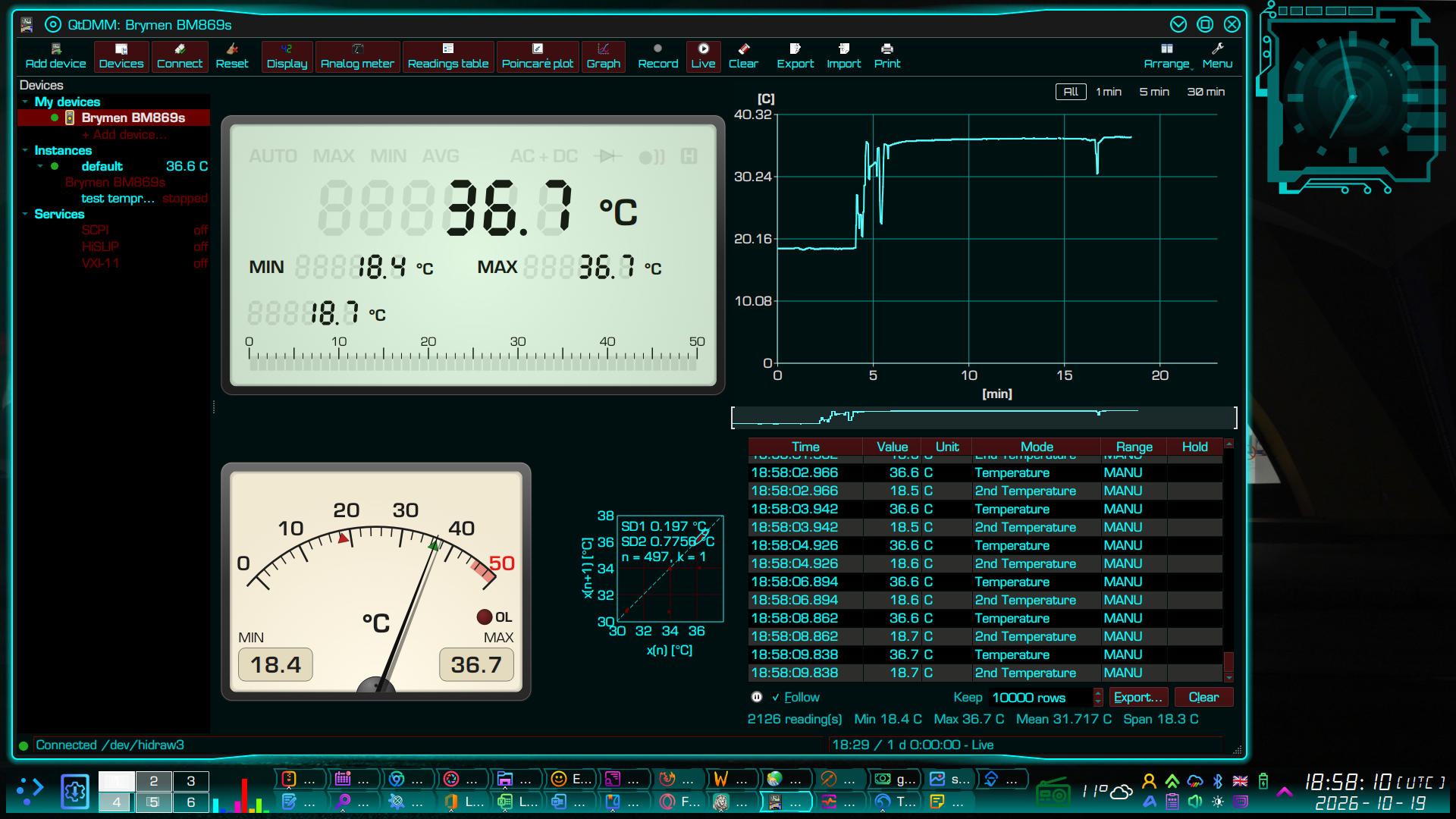
QtDMM 26.2
Just received a message from the maintainer of the QtDMM digital multimeter software project to announce that the QtDMM2 v 26.2 has just been released. It’s packed with quite a lot of interesting new stuff, with support for 222 multimeters, including dual scale meters such as my trusty Bryman BM869s. There are versions for GNU/Linux, MacOS, MS Windows as well as FreeBSD, And, as the header image for this article demonstrates, it integrates beautifully with QT6 and the KDE Plasma 6 Desktop too.
QtDMM – feature list
This is a bulleted list of its main features, lifted straight from the project’s documentation. What comes after version 26.2 is listed separately at the end of this article.
At a glance
- Readout and recording software for digital multimeters and other instruments with a PC interface.
- Since 2001: started by Matthias Toussaint, continued by tuxmaster from 0.9.5, now at https://github.com/qtdmm/QtDMM.
- 26.1 (4 October 2026) was the first release since 0.9.8; 26.2 is at the release candidate stage (rc1 of 12 October).
- Calendar versioning: YY.N (26.1, 26.2, …).
- Qt 6, C++17, CMake.
- License GPL-3.0-or-later; the symbol sets are LGPL-3.0-or-later (KDE Oxygen/Breeze).
- Runs on GNU/Linux, Windows, macOS and FreeBSD.
- User interface in English, German, Spanish, French and Polish.
- Website and handbook: https://qtdmm.de.
Meters
- 222 models from 48 vendors over 34 protocols; 88 of them confirmed with QtDMM on real hardware. The others were added from datasheets and protocol descriptions and are marked in the list.
- Vendors include: UNI-T, Voltcraft, Brymen, Fluke, Keysight/Agilent/HP, Siglent, APPA (and relatives such as BENNING, Sefram, ISO-TECH), Metex, MASTECH, PeakTech, Tenma, Victor, Velleman, Elma, Greenlee, Sanwa, Digitek, TekPower.
- Not only multimeters:
- luxmeters (UNI-T UT382, Benetech GM1020);
- thermometers (UNI-T UT325 and relatives, MASTECH MS6514);
- CO2 meters;
- Victron devices (SmartShunt/BMV, SmartSolar/BlueSolar MPPT, Phoenix Inverter).
- Bench meters with SCPI (Keysight, Agilent, HP, Siglent) through sigrok-cli.
- Meter keys on screen for the UNI-T UT60BT, UT61B+/D+/E+ and UT161: SELECT, RANGE, HOLD, REL, MIN/MAX etc. press the meter’s keys.
- Unknown meters: protocol and interface can be set freely (Manual settings). The device list’s “Chip” column helps to find an identical meter.
- Meters that need a hardware modification first are marked in the list.
Connections
- Serial (RS-232): USB-serial adapters and native UARTs. The control lines (DTR/RTS) for cables that draw their power from them are set automatically.
- USB-HID cables:
- HE2325U/CH9325, CP2110, CH9329 (UNI-T UT-D09 in both revisions) and Brymen BU-86X;
- a cable is found again after replugging;
- on Linux a udev rule with stable device names (/dev/qtdmm/…).
- Bluetooth LE (Linux, Windows):
- UNI-T UT60BT, UT61B+/D+/E+ with the UT-D07B adapter, UT161;
- Victron via its encrypted “Instant Readout” broadcasts.
- Network: RFC 2217 (a serial port over the network).
- qtdmm-bridge: a small service, for example on a Raspberry Pi, that puts serial and USB-HID meters on the network.
- QtDMM finds the bridges by itself via mDNS.
- sigrok-cli as a backend for everything libsigrok supports.
- Connection watchdog with automatic reconnect.
Setting up devices
- “Add device” assistant:
- It asks how the meter is connected and searches there: USB cables, Bluetooth, network bridges.
- Recognised meters are listed first.
- When a port may not be opened, it says why and what to do (e.g. the dialout group).
- “My devices”:
- Your own meters with their connections, in a sidebar.
- A click switches the meter; the context menu entry “Open in a new window” opens it in a window of its own.
- “Find device”: a saved device is recognised by its place (USB port, Bluetooth address).
Displays
- Digital display in LCD style:
- annunciators AUTO, HOLD, AC/DC, AC+DC, diode, continuity etc.;
- bar graph, min/max;
- colour variants: classic, blue backlight, amber, high contrast, custom colours.
- Analog meter:
- auto-ranging scale, min/max marks, red zone;
- centre-zero scale;
- unit on the dial.
- Readings table: every value with time, function and range, plus min/max/mean/span. Copy to a spreadsheet or export.
- Poincaré plot: each reading against the next. Noise and drift show at a glance, with SD1/SD2 and their ellipse.
- Window layout:
- all views as windows in one area, arranged automatically or freely;
- workspaces saved to and loaded from a file.
- Designs System, Silver and Dark.
- Symbols: Oxygen in colour, Breeze light/dark, or the desktop’s icon theme.
- A meter that falls silent shows at once: the displays fade its value.
Graph and recording
- Three modes:
- Live: runs right after connecting;
- Recording: ● REC with elapsed time;
- View: a finished recording or an imported file.
- Every reading is stored with its time:
- no fixed sampling grid, short spikes are not lost;
- up to two million readings per recording.
- Start:
- by hand;
- at a clock time;
- when a threshold is crossed upwards or downwards, with pre-trigger: the recording reaches back by the time set before the trigger, a green mark shows it.
- Length is asked at the start, or the recording runs until stopped.
- Clean data:
- an overload (OL) or a dropout is a gap in the graph instead of a wrong value;
- when the meter switches to another function (V → Ω), the recording ends with a mark; a recording never mixes two quantities;
- a range change (mV → V) carries on.
- Graph:
- time buttons All / 1 min / 5 min / 30 min; zoom with mouse wheel and keyboard;
- crosshair with time (ms) and value;
- vertical axis in the unit the meter shows (350 mV, not 0.35 V);
- long recordings stay fast without losing spikes (min/max per pixel column).
- Integration curve: the integral over time, e.g. Ah or Wh from a current or a power.
- Colour variants: neutral, scope blue, phosphor green/amber, chart recorder, custom colours.
Alarms
- Named conditions:
- above, below, outside a range;
- overload;
- readings stop coming.
- With a minimum duration and hysteresis.
- Actions:
- banner, beep, popup, bring the window to the front;
- mark in the graph;
- start/stop a recording;
- run an external program with value and unit as parameters. If wanted, QtDMM releases the port meanwhile, so the program can use the meter itself.
Export, import, print
- Data export:
- CSV, Excel (.xlsx) and OpenDocument (.ods), with real date and number cells;
- on the grid of an adjustable interval (time-weighted mean) or every single reading.
- Import of CSV, also the format of old QtDMM versions.
- Graph as an image:
- SVG and PDF as vector graphics, e.g. for Inkscape and documents;
- PNG and JPEG;
- as a picture to the clipboard.
- Print with title and comment.
Several meters, calculated values
- Several meters at once, one per window (instance).
- Recording started and stopped in all instances in sync.
- Calculated values: an instance computes a formula from the readings of the others, e.g. power = voltage × current. The result is shown, recorded and exported like a meter.
- Simulated meter:
- waveforms sine, triangle, square, sawtooth, random, constant;
- plus noise and custom formulas;
- for trying QtDMM without hardware, for demos and testing.
Remote access
- SCPI server:
- the meter answers like a lab instrument to
*IDN?,READ?,CONF?etc.; - raw TCP socket and HiSLIP (VISA);
- usable from lxi-tools, Python/PyVISA, NI-VISA and LabVIEW;
- announced on the network via mDNS.
- the meter answers like a lab instrument to
- Screenshot of the QtDMM window over SCPI (
HCOPy:SDUMp:DATA?), as with a bench instrument.
Operation
- Keyboard shortcuts for everything important (function keys for connect, settings, recording etc.).
- Handbook built into the program (F1); the same pages are on qtdmm.de.
- Command line: several configurations (
--config-id);--debugprints every frame as hex (for bug reports). - Settings on six pages. The settings dialog neither disconnects the meter nor stops a recording.
Platforms and packages
- Linux:
- AppImage as a ready-made download;
- DEB and RPM from the sources (
./compile.sh pack), spec file for Fedora COPR; - PKGBUILD for Arch/CachyOS;
- Nix flake (
nix run github:qtdmm/QtDMM), on NixOS with the udev rule. The flake comes with 26.2.
- Windows: installer and ZIP.
- macOS: .dmg for macOS 13 and later. Bluetooth is not available there yet.
- FreeBSD: build from the sources.
- Release builds are made automatically from git tags; source archive with a fixed checksum for distributions.
For contributors
- Protocols: every protocol is documented as a specification with test vectors (docs/protocols). The decoder tests are generated from them.
- CI builds and tests for Linux, Windows, macOS, FreeBSD and Nix.
- Doxygen API documentation online.
- Contributions:
- CONTRIBUTING and issue forms for bugs, device reports and new meters.
- A capture with
--debugand a note of what the display showed is enough for a new decoder.
- Disclosed openly: an AI assistant (Claude) helps with the development.
After 26.2 (work in progress, not in this release)
This is what to expect in 26.3 and beyond…
- Graph:
- reference line that snaps to 0, mean, min or max or to an alarm threshold;
- time cursors A/B with Δ, mean and integral, as flags below the graph;
- overview strip (minimap);
- min/max envelope.
- New UNI-T Bluetooth meters:
- UT202BT clamp meter;
- UT383BT luxmeter;
- UT353BT sound level meter;
- UT363BT anemometer and UT333BT (temperature/humidity) to follow.
- They bring new units (m/s, %RH, dBA/dBC).
- VXI-11 next to raw SCPI and HiSLIP.
A sneak preview of 26.3 and beyond can be seen by compiling from source, as detailed here.
Links
- Free download of QtDMM:-
https://qtdmm.de/download.html - QtDMM’s new GitHub:-
https://github.com/qtdmm/QtDMM - QtDMM’s project website:-
https://qtdmm.de/ - Installing QtDMM from source:-
https://garfnet.org.uk/cms/2026/09/19/install-qtdmm-on-debian/